

In the final month of 2025, KnitOne’s development team doubled down on strengthening the platform at its core.
A series of focused updates and new features enhanced production accuracy, tightened yarn movement control, and reinforced overall system stability.
Together, these improvements cleared long-standing operational friction and empowered factory teams to make faster, more confident day-to-day decisions.
What are The Major Updates of December in KnitOne?
The section below summarizes the impactful updates delivered in KnitOne in December 2025.
1. Smarter Yarn Planning and Inventory Accuracy
Several updates were introduced in the Yarn Purchase and Inventory modules.
Multiple delivery timelines within a single Yarn Purchase Order (PO) were enabled. Additionally, the delivery date was added to the HAB section of the Approve Yarn PO activity, and Total Quantity was included in the Delivery Dates dialog box.
The yarn return workflow was also updated, allowing yarn to be returned from YDR (garment production) Inventory to Yarn Inventory even when the related knitting order was closed or cancelled.
Not to miss, Minimum Yarn Quantity and Branch filters were added to the Weekly Yarn Report.
Impact:
- Helps inventory and procurement managers manage yarn deliveries and returns more accurately.
- Enables planning and merchandising teams to plan orders confidently with clear yarn availability visibility.
2. Stronger Knitting Order Control
Here, we have two types of major updates. Let’s get into the details:
- Sample order updates
Sample orders were updated to correctly display 0 kg as the calculated yarn quantity. After the sample data collection was completed, the system automatically opened the Style Process Map, ensuring process mapping was addressed immediately.
For SMS Sample orders, the Yarn BoQ was automatically created at the time of order lock, removing the need for manual BoQ creation.
- Knit Order Unlock feature
An Unlock feature was introduced for Knitting Orders (KO), enabling cancelled knitting orders to be reopened when required.
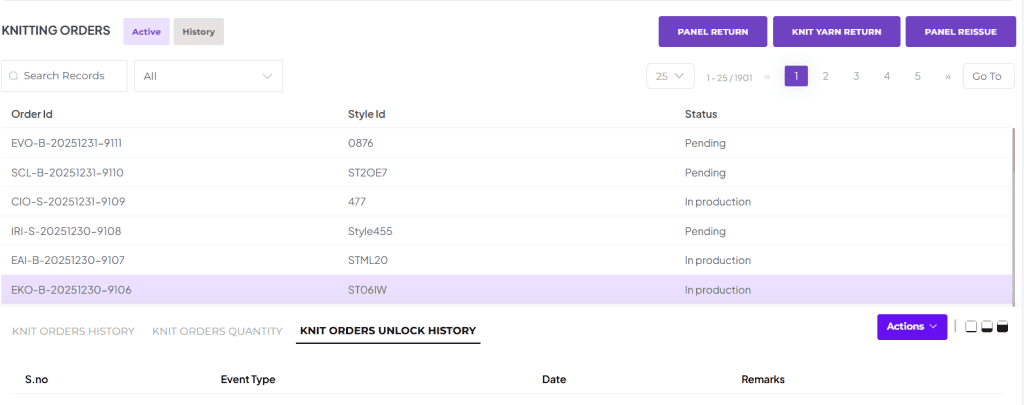
Once an unlock was approved, the knitting order correctly returned to its previous valid state instead of remaining in an incorrect or cancelled status.
The Request for Unlock Order option was removed for Hold Knitting Order status to prevent unnecessary or invalid unlock requests.
At present, Knitting Orders can be transitioned correctly between Active, Hold, Cancelled, and History states.
Impact:
- Helps planning and merchandising teams avoid sample-related confusion.
- Enables production and operations teams to manage knitting order unlocks more reliably.
3. Sales, Invoicing, and Pro Forma Enhancements
Several improvements were made to sales and invoicing workflows to support clearer financial control. For this month, Pro Forma was the main focus. Below are the updates made for easier and accurate Pro Forma invoicing.
- Pro Forma invoices can now be generated for Make to Order clients.
- A Surcharge section was added to the invoice, and new fields were introduced in the Create/Edit Pro Forma flow.
- Downloaded Pro Forma invoices followed a standardized format, and Freight and Advance charges appeared only when applicable.
- Freight and Advance values can also be added during New Sales Order creation.
Impact:
- Helps merchandising teams prepare cleaner Pro Forma and sales documents without manual adjustments.
- Enables finance teams to review, validate, and process invoices faster with consistent formats and applicable charges only.
4. Improved Style and Master Data Management
After yarn, style becomes the foundation of knitwear production. Several improvements were made to the Style Management module.
- Upload and delete permissions were added.
- When a style was replicated from an existing style, all style details and uploaded documents were copied.
- Additional filters, such as Production GG and Buyer GG, were added to the Manage Style list page.
- A new Manage Style Category section was introduced along with a Master Category Search option.
Impact:
- Helps merchandising and product development teams create and manage styles faster.
- Enables consistent style categorization and easier style discovery across teams.
5. Better Plan and Schedule Visibility
Numerous downloadable and viewable reports relating to production planning were created. Some of them are as follows:
- PPC Machine View was enhanced with a Download button to export data in Excel.
- Schedule reports about Yarn Arrival, Trims Arrival, and Changeover (from one style to another) are added.
Impact:
- Helps production planners review and share machines and schedule reports without manual consolidation.
- Enables operations and floor planning teams with items to track readiness and prevent last-minute disruptions.
6. Permissions and Operational Safeguards
Several permission controls and operational standards were added to reduce risk and improve accountability. Some major ones are as follows:
- Unlock actions for packaging cartons were made permission-based.
- The Branch filter was removed for Store HOD users in New Item Purchase Orders, and Manage Category access became permission-controlled.
- For SMS Order types, Specification and Image upload were made mandatory to lock an order.
Impact:
These controls help the factory operate with clearer responsibility boundaries, reducing unauthorized actions and process deviations.
Bug Fixes & Stability Improvements
The following bug fixes were made to address system inconsistencies and workflow defects identified across various modules.
- Issues related to tech packs, image uploads, and UUID values in Style Category and Colorway fields were resolved.
- Yarn issuance, yarn returns, YDR workflows, and warehouse stock updates during transfers were corrected.
- Yarn Purchase Order delivery dates now follow a consistent chronological order without duplication.
- Repeated confirmation dialogs during invoice edits were removed, and multi-PO vendor invoice editing issues were resolved.
UI/UX Improvements and Impacts
The UI/UX updates were focused on making buttons, dialog boxes, and screen flows clearer and more consistent across modules. Dropdowns, filters, tabs, and confirmation screens created by the UI/UX team can now provide the right information at the right time. This makes navigation easier and reduces confusion for users.
Overall, these improvements reduce manual intervention, enhance visibility across departments, and enable factories to operate with greater confidence.
For More Enticing Updates, Subscribe to Our Newsletter.
