As your knitwear business grows, managing complexity becomes harder than managing orders. More styles, tighter timelines, and larger teams push you to look for a meaningful digital transformation solution like an ERP.
However, only understanding the concept of ERP is not enough; you must also understand:
- What it takes to implement ERP,
- How long it takes, how disruptive it might be,
- What will it demand from your factory
Here’s the key reality to keep in mind: ERP implementation is a business change project disguised as software.
In this blog, we’ll walk you through how an ERP is implemented, so you can move forward with clarity and confidence.
First, let’s understand what exactly ERP implementation in knitwear manufacturing is.
What is ERP Implementation in Knitwear Manufacturing?
ERP implementation in knitwear manufacturing is a process of moving your knitwear factory away from fragmented ways of working—manual store records, reactive production planning, etc.—into one organized system where everyone works with the same information.
Moreover, a successful ERP implementation is fundamentally a major organizational change that streamlines business processes, workflows, company culture, and employee roles.
| A Shocking Fact In discrete manufacturing, 73% of ERP implementations fail, and projects often run 215% over budget because traditional implementation methods do not properly handle the complex realities of manufacturing operations (Godlan). |
Who is Needed for ERP Implementation?
An ERP implementation typically involves an executive sponsor, project manager, business analyst, ERP consultants, end users from key departments, and IT/Technical support. They all work together to ensure the system aligns with business needs and runs reliably.
Before ERP is implemented, you should do preparatory work. Skipping these steps is the main reason ERP implementations feel slow, confusing, or disappointing.
Let’s understand the preliminary steps.
- Be clear on why you need ERP and what problems it should solve.
- Get leadership on the same page about how ERP will change existing ways of working.
- Decide where to start by selecting the departments and processes for the first phase.
- Assign clear internal responsibility so decisions don’t get delayed.
- Set expectations with teams early so that ERP will bring more structure and accountability.
- Select the ERP that is tailored just for knitwear manufacturing and best-suited price for your factory.
Once these are confirmed, the ERP service providers directly execute technical work with consultants embedded on-site. Also, the internal teams within the organization act as secondary support for validation and adoption.
Let’s now understand the main steps of implementing ERP in your factory.
Step-by-Step ERP Implementation Guide
Let’s get into the details of ERP implementation steps.
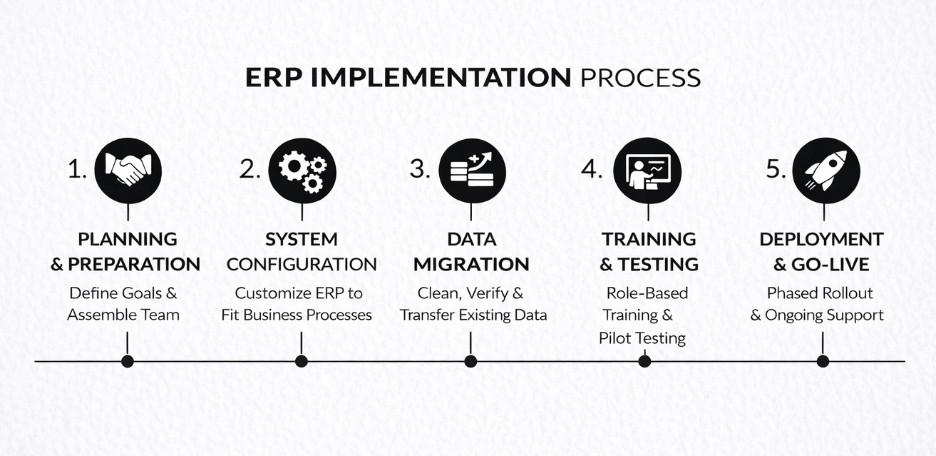
Step 1: System Configuration and Module Setup
ERP implementation begins by configuring the system to fit how your business actually works.
In this step, you define organizational structures, configure core modules like finance, inventory, and supply chain, and set clear user roles and access.
Many ERP projects fail at this stage due to a mismatch between the software and real operational needs. This often happens because the decisions are driven by ERP features rather than workflows, or key users are not involved early.
A well-known example is Lidl, where insisting on legacy inventory logic led to heavy customization and the eventual abandonment of the ERP project after nearly seven years and €500 million (Source: Henricodolfing).
To avoid any sort of issues in this step, you should:
- Conduct a detailed requirements analysis across departments
- Document real workflows
- Prioritize what truly matters before finalizing configurations
Step 2: Data Preparation and Migration
Here, you decide on what information you want to move to the ERP and how reliable the system will be after go-live. This step is critical because around 38% of ERP failures in manufacturing are caused by poor data migration. In the long run, it leads to planning errors and shop-floor disruptions when core data is incorrect.
For data migration, you must consider the following data:
- BOMs (yarn blends, gauges, dye details, size-wise consumption)
- Inventory records (item lot, batch, quantity, trackers, etc.)
- Buyers’ details (specific styles, sizes, colors, preferred vendors, linked merchandisers, etc.)
- Vendors’ data (relevant supplies, pricing, quality history, etc.)
- Limited production references, like style specs or machine outputs.
To reduce risk, you should adopt the famous ‘Lean Migration’ strategy, which suggests migrating your last 2 years of history for reporting and all open orders to maintain operations. You can store all other legacy data in a low-cost, read-only archive for compliance.
Step 3: Employee Training and User Role Mapping
In this step, the ERP is introduced to your manufacturing unit. Since they are new to this system, employee training becomes a must.
Further, the training should be role-based. Merchandisers, inventory manager, procurement head, production manager, sales team, etc. should learn only what they need to do in the system, not everything ERP can do.
At the same time, user roles should be clearly defined—who enters data, who approves it, and who reviews it. This clarity is critical because mismatched ERP roles cause 29% of go-live delays, while proper role mapping improves ERP adoption by 52% in apparel businesses.
Let’s look at an example of Target Canada when they did not consider this step. When Target expanded into Canada in 2013, it launched a new ERP system without sufficient end-user training. Inexperienced users entered incorrect data at scale, which quickly disrupted the supply chain (Canadian Business).
During this step, employees’ resistance to change became evident as ERP systems challenged their “informal habits” with accountability. Strong change management would have saved them. Why? Because it would have safeguarded Target Canada against 75% of failures caused by resistance and the 61% budget overruns typical in manufacturing ERP projects.
Step 4: Pilot Testing (User Acceptance Testing)
Once your teams have been trained to understand their roles, the next step is to validate the ERP in real working conditions. This is done through User Acceptance Testing (UAT), where the system is tested using actual business scenarios—real orders, revisions, approvals, delays, and exceptions—before it is rolled out fully.
Unlike earlier testing done by the developers, UAT is carried out by the end users from various departments. At this stage, users will actually test the ERP to confirm if it supports their work.
UAT helps identify gaps, misunderstandings, or configuration issues before going live. When users test the system themselves, they gain confidence in how ERP supports their daily work. This makes the final ERP launch smoother and increases the likelihood that the ERP will be used correctly and consistently.
Here is an example of what happens when UAT isn’t considered:
Hershey, a popular confectionery brand, attempted to implement ERP along with supply chain and CRM systems under a tight Y2K deadline. The company did not do a thorough test on the system or adequately train its staff.
Results? The system failed during peak seasons, leaving $100 million in orders unprocessed, causing a 19% drop in quarterly profits and an 8% fall in stock price (SlideShare).
Step 5: Go-Live Execution (Phased Rollout)
This is the point of deployment, where ERP officially moves into daily use and becomes the system you rely on to run operations.
Even with good preparation, this phase can feel hectic; there are many moving parts, and teams may still have questions. During this time, the project team and your ERP partner need to stay closely involved to support users, resolve issues quickly, and keep operations running smoothly.
Here, it’s crucial to set realistic expectations. Overall operational productivity may dip briefly as teams adjust to the new system. But with consistent support and guidance, usage stabilizes, and efficiency improves.
A strong management involvement at this stage ensures better ERP adoption that prevents teams from slipping back into old ways of working.
After ERP becomes live, your focus should shift to supporting users, fixing issues, and making small improvements as people settle into the system. Ongoing updates and continued training help you keep ERP running smoothly and delivering value over time.
Well, at this point, you must be wondering what amount of time it takes to implement ERP in your knitwear factory. Let’s find the answer.
How Long Does ERP Implementation Take?
For most knitwear factories, ERP implementation does not happen in weeks. It takes:
- 3 to 6 months for small to mid-sized factories
- 6 to 9 months for larger or more complex operations
This timeline is shaped less by the ERP and more by:
- how organized the factory already is,
- how clean existing data happens to be,
- how quickly management resolves ambiguities,
- and how consistent changes are enforced.
These were the steps involved in bringing the ERP system into your factory. However, to ensure efficient, reliable, and long-lasting use of ERP, you must consider some major points, which are discussed below.
5 Key Considerations When Implementing ERP
Let’s look into the 5 pointers that are necessary to focus on before implementing the ERP for knitwear manufacturing.
- ERP should be simple for teams to use daily without confusion, so data stays accurate, and the system is adopted.
- The ERP should give clear visibility from yarn purchasing to material receipt, keeping procurement, stores, and production aligned.
- Merchandisers should have an easy way to create accurate, repeatable costs for knitwear styles without relying on complex spreadsheets.
- For production planning, ERP should support capacity-based, standardized planning, so production runs smoothly instead of reacting to daily issues.
- The chosen ERP should adhere to regulations to meet SDG 12, which emphasizes responsible consumption and production.
All of these industry pressures and operational challenges were the precursors to the development of KnitOne—a tailored ERP for sweater manufacturing. But why KnitOne? Find out in the next section.
Why Choose KnitOne as ERP for Your Knitwear Manufacturing?
KnitOne was built with one clear understanding: knitwear manufacturing has complexities that generic ERP systems often overlook.
Envisioned by industry experts and refined through continuous feedback from factory teams, KnitOne’s core structure already aligns with real knitwear manufacturing workflows, which is why heavy customization is rarely needed.
Core modules like Yarn Inventory, Costing & Sales, Production Planning and Control, Order Balance Sheet, and Dashboards & Reports are designed to support how departments work together in knitwear manufacturing.
What also makes KnitOne easier to adopt is that you don’t need third-party consultants. Implementation, training, and support are handled directly by the in-house team, keeping timelines tighter, costs lower, and issues resolved faster.
To be more specific, KnitOne is a natural fit for flat-knit operations. If you want to go deeper into this perspective, you can go through our Why KnitOne is the best ERP for flat-knitwear manufacturers blog.
Final Thoughts
ERP implementation in a knitwear factory is not a one-time event—it’s a structured journey that unfolds in stages.
From preparation and system configuration to data migration, role-based training, pilot testing, and phased go-live, each step plays a critical role in determining success. When these stages are rushed or misunderstood, ERP feels disruptive; when they’re followed with clarity, ERP becomes a foundation for scalable growth.
Moreover, ERP success depends less on software features and more on how well the implementation steps are followed. This is why choosing an ERP that already understands knitwear workflows matters.
KnitOne is built around the knitwear manufacturing realities, helping factories move from legacy systems to ERP with clarity and confidence.
So, why wait? Boost profits with KnitOne’s complete operational visibility.